Tuesday, April 9, 2013

Been Working on Cyrene

I have NOT been in the Shack or working in my eShop much lately, I have been at the marina repairing my boat - Cyrene.

Cyrene on a Previous Cruise
Due to life's other duties and responsibilities, Cyrene has been neglected for several years. On our last boat trip, we had an engine or transmission failure. I did not know which, but I did know the repairs could be minor, or something major, Cyrene was stored afloat in the boathouse, . . . Well, now several (many) years later, it turns out to be major, which means $$$. My goal is to have Cyrene back on the water by May 1, ready for short cruises this summer.

Once Cyrene is repaired, and now that I am retired, I plan to operate my Ham Station form locations around Puget Sound, on the water as WA0UWH/m.

Puget Sound is a wonderful place to have a boat, there are many destination; marinas, bays, coves and anchorage. Also, easy access to Canadian inland water around Vancouver Island and Vancouver (city) is always a treat.
Cyrene Anchored Among the Stone Spirits
at Roscoe Bay Canada
(A few long years ago)
One of my favorite destinations is Roecoe Bay in Desolation Sound Canada. According to local lore, Stone Spirits lurk in the waters of the bay. And, often when the water is very still, rocks alone the shore reflect in the water as a mirror image. The reflection produces the illusion of a very long and symmetrical horizontal Totem Pole - A Stone Spirit. To see the effect, look at the shore line in the photo while tilting you head to the left.

Another of my favorite destinations is Prideaux Haven, also in Desolation Sound. The tidal exchange from the North and South, around Vancouver Island, meet near Prideaux Haven and therefore very little cold water from the ocean mixes with the warmer water found in this area. The warmer than normal water, makes for very good clear-sea-water swimming. An online Gallery of photos shows scenes of the area.

So far, work on the Cyrene has been fun. But, as everyone knows, . . . "A boat is just a hole in the water, in which to throw money".

UPDATE - May 20, 2013
Starboard Engine repaired, Cyrene went back into the water on May 2, but sea-trials found that the Starboard Engine would not go to full speed (3000 RPMs). The Injector Pump was removed and sent in for test, repair (if necessary), and calibration.  The theory is that a little salt water entered the "boost compensator" and stopped it from working.

UPDATE - July 4, 2013
Most repairs are done, I have parts for the GenSet, but will have to wait for time to install them. Two recent trips to the San Juan Islands have proven the repair to the Starboard Engine was very successful. At full throttle and 3200 RPM at 19.9 Knots GPS was available from both engines, my normal curse is at 2200 RPM at about 10 Knots.

--

Thursday, March 21, 2013

RPi as a WSPR Beacon with PA47


UPDATE:
Sorry,  this did NOT work as expected, the Wsprrypi code is still being developed. The second fork of the program is available. The RF output of the of the RPi is less noisy if the DC supply is from a well filtered source.


I have previously built my Homebrew PA47 Power Amplifier for a Propeller Microprocessor Beacons (see previous selected posts). The Propeller provides 12mW to drive the PA.

The Raspberry Pi provides about the same output power via the Dan Ankers Wsprrypi program. Therefore. it was a simple mater of connecting to the correct pins on the RPi GPIO Connector to give it a try. Thanks Dan !

Here is my initial lash up, with just a Low Pass Filter (LPF).
RPi WSPR Beacon with LPF
Measure Output into 50 Ohms =  5dbm
Here is the RPi and the PA47, with input and output LPFs attached.

With the two low pass filters, the measured output is 9.4 V PP at a 50 ohm load, or 220mW, which is 23.4dbm. The Dan's WSPR program uses only about 3% of the CPU.


I have plans to modify Dan's Wsprrypi program to include other beacon modes (e.g., QRSS) similar to those that I have used with the Propeller Processor.

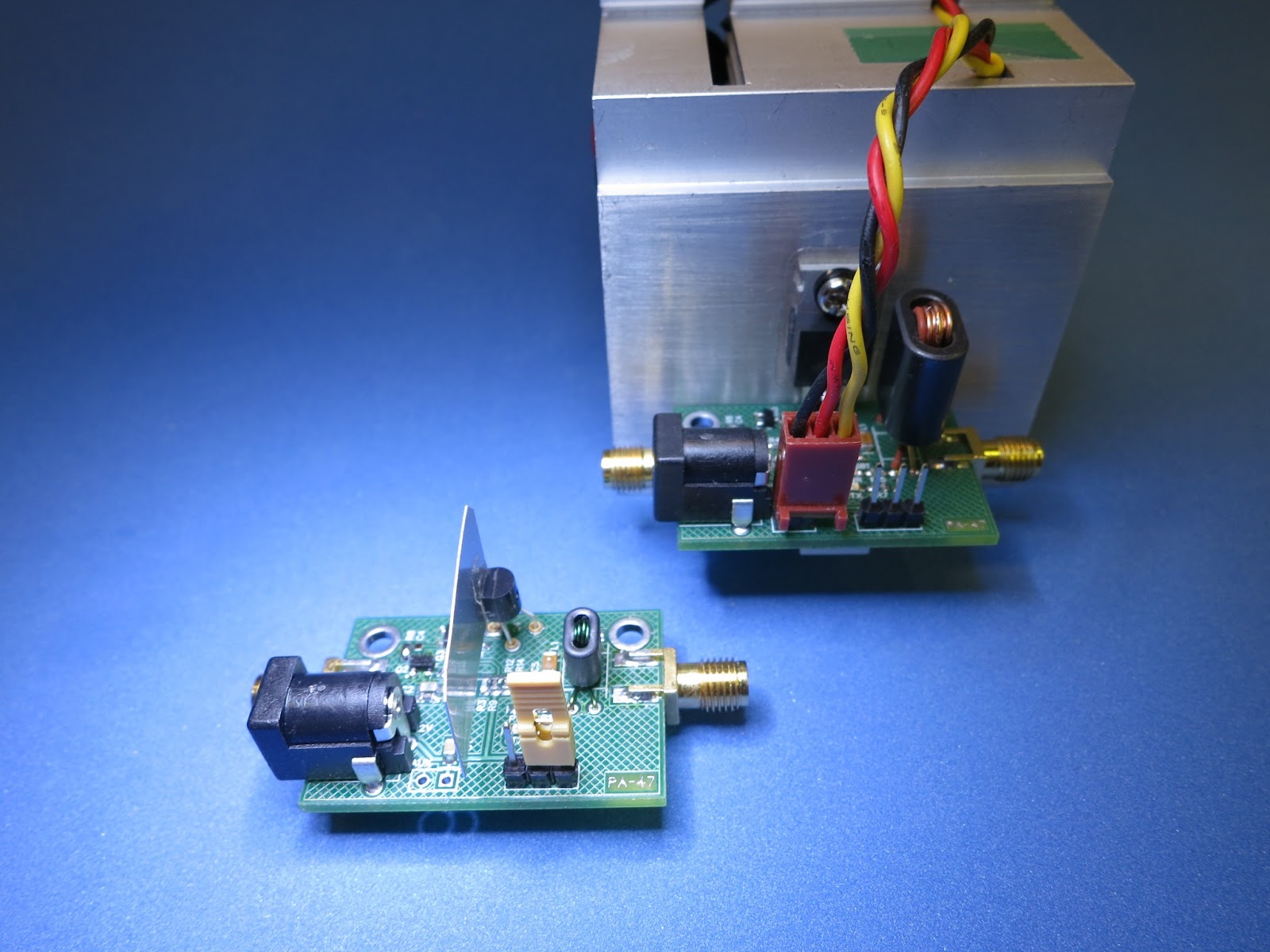
FYI, This my complete family of experimental PA47 Amplifiers.
My PA47 Family
Max Power - 1w, 5w and 15w

On the air, WSPR Received Reports will be added here.


-- Home Page: https://WA0UWH.blogspot.com

Thursday, March 14, 2013

National Pi Day

Today, Mar 14, 2013 is National PI day.

When written as numeric today's date is 3/14, is similar to 3.14, which of course is the value of the first three digits of PI.

PI Day should be celebrated at 6:28 am, as that is the value of  "Tau", which is the value of  2xPI.

Today is also Albert Einstein's Birthday Anniversary (Mar 14, 1879) - PI Day is a well fitting tribute to a great man.

--

Wednesday, March 13, 2013

Rpi on the Network - Problem Fixed !

My Raspberry Pi is now back on the Network (see: my Rpi posts).

It has been offline, because I did not have an HDMI Display, and was not able to see the boot error messages. And, therefore I was not able to correct the boot problem.

I now have an HDMI Display, and have fixed the boot problem. The Rpi needed a simple "manual file system check" (i.e., fsck -y /dev/<disk>).

Currently my Rpi is back on the Network as before at: http://rpi.wa0uwh.com:8040/

The Rpi maybe on-or-offline the next few weeks as I try different system configurations.

--

Monday, March 11, 2013

Mom's Biscuits

This is post is not about Ham Radio, but about something else that I enjoy - eating good food.

Mom's Biscuits

On Saturday, Mom would have celebrated her 89 Birthday. And for that, I decided to try to make some Biscuits, the way she has done so expertly many time for our family Saturday morning breakfast (which was such a long time ago).

Mom was famous for her Biscuits and Pies. Nothing in the Cookbooks came close to; look, taste and texture of her baked goods. Her Biscuits were almost three inches tall, and very flaky, soft and crisp on the outside, she would always say: “I don’t know if they’l be fit to eat!” - but they were always, soooo . . . very-very good!

Somehow Mom’s always got the volume of dough just right, regardless how many people were eating. We would end up with just the right number of Biscuits for each person, plus one more. The last Biscuit was made from the trimmings, left over dough from the cutting process. My brother, two sisters and I, argued over who was to receive the highly prized Ugly Biscuit. For most of my childhood, Mom cut the Biscuits with a Red Handle Donut cutter (with the center hole cutter removed), later she switch and used an easy available drinking glass to make the cuts. This was way back in the good’old-days. when calories were NOT counted, . . . but Biscuits were.

I have tried several times in the past forty years to make Biscuits. The first time was while Mom was still alive, but that did not seem to help. My Biscuits always came out like the dreaded Hockey-Pucks. In fact, in my childhood family, there was a running joke; there were only two types of Biscuits; Mom’s, and Hockey-Pucks. Somewhere along the way, my sisters, seemed to have learned how to make Biscuits, but I had not.

Lately, I have been thinking about Mom’s Biscuits, I think I have always had the ingredients about right, although Mom never really followed a recipe. She would say; put in some of this and that, mix it up, knead it with your palm, pat it out flat, cut the Biscuits, and don’t play with the dough. I think her “technique and style” was more important than the ingredients. Maybe, I had just NOT learned the "technique and style" part of making Biscuits.

As stated, I have been thinking about Mom’s Biscuits, and thinking about how fast she worked at; the mixing, kneading, folding, cutting, and the fast clean up of the mess. Now, while remembering, I can still see her work at each step, and that is what I am now trying to duplicate with my new Biscuit making efforts.

Mom would have pre-heated the oven to 350 degrees F, although she would never wait for the oven to reach the set temperature. Once in the oven, a timer was NOT used, the Biscuits came out of the oven about 10 seconds before we were to set down to eat. To this day, I do not know how she timed meals so expertly.

I do not have a standard oven, for my baking efforts, I have a rotating Pizza Oven, on which I have cooked almost everything - it works better than expected for an oven. I have used it to cook some very good Brownies. My Biscuit efforts will cooked on the Pizza Oven.

Several weeks ago, I first tried the Pizza Oven for Biscuits with what I remember of Mom’s Biscuit recipe, but as usual, I got Hockey-Pucks. The puck tasted OK, but Tess (my dog) liked the pucks better than I.

Now, with my new appreciation for Mom's “Technique and Style”, I am trying again, with much better results.

I don't know if they'l be fit to eat !
.
Biscuits In the Oven
Mom's Biscuits were typically larger diameter (depending on the water glass she used as the cutter), for my first attempt my biscuits are smaller and leaned over as they cooked. For the next batch, I will find something larger to use for the cutter.

More Biscuits to be Saved For Later
Note: the obligatory Ugly Biscuit in the center.

There will be Biscuits left over and saved for later.

BTW. this batch of Biscuits were pretty Darn Good, but not exactly how I remembers Mom's. A little more thinking and practice is needed.

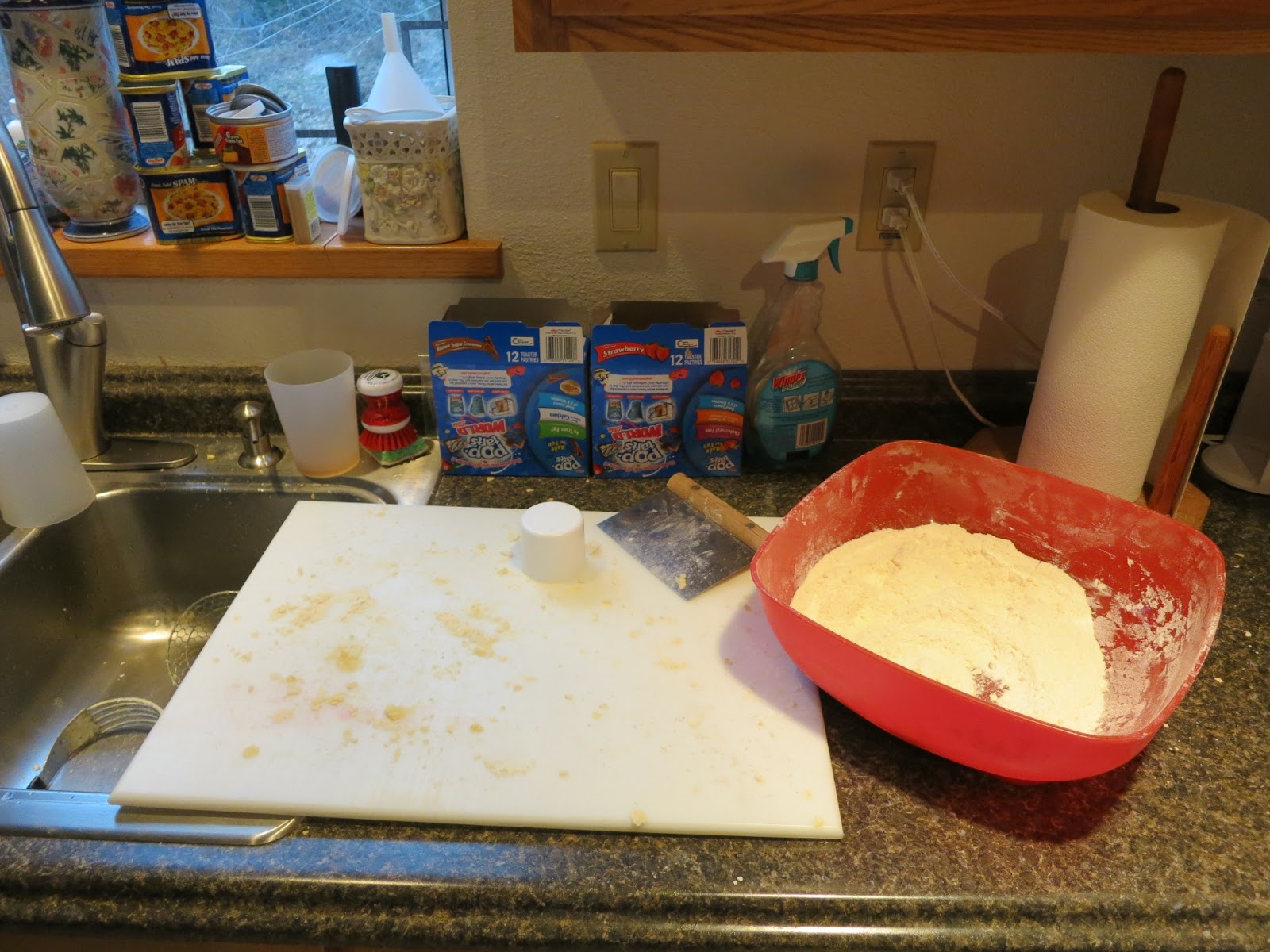
Now, the mess needed to be cleaned up, this is something Mom would have done within seconds, after the Biscuits were in the oven.
It is a Big Mess, . .  but it was worth it !

Thanks Mom, . . . for the great memories, . . . and Happy Birthday !


--

Sunday, March 10, 2013

Rpi on the Network - NOT !

Sometime today my networked RPi died, not sure why, but I will not have time to fix/rebuild it until later this week. At last count it had served web requests from 213 remote users. See previous post.

The RPi file system and log files still exists and can be mounted on another system for review.

I hope it was not Hacked!

More info later.


UPDATE
The RPi is back on the Network as http://rpi.wa0uwh.com:8040/, but it maybe up or down depending on my experiments.

--

Wednesday, March 6, 2013

Rpi Backup

My Rpi is working very well (as shown on previous post). My many years of Admin'ing UNIX systems is paying off.

I have spent several hours / days configuring the system, building a web page, and playing with use ideas. I do NOT want to lose any of my efforts due to a dumb mistake or system crash - so a backup is needed.

Several backup strategies are suggested in the web forums, the most often mentioned method is; shutting down the Rpi system, and cloning the SD card. Which I think is a good idea - but maybe only once in a while. The size of my 16GB SD card and system interruption precludes doing this very often.

Most of the Rpi system is easily re-built from the original image, and most (if not all) other system additions are obtained from online software depots.

After building (cloning) the original SD image, and like most Rpi users, I expanded the file system size to fill the rest of the SD card. And then executed the following:


sudo aptitude update
sudo adduser --system <my-desired-user-name>


And, of course, I had to install "fldigi" for a potential radio connection.


sudo aptitude fldigi


Now, . . . I really do not need a full backup, just the backup important stuff. A very clever backup command is "rsync", which I have used many times on very large systems. Rsync can be installed as:


sudo aptitude install rsync


With the following rsync command,  I can backup a few important directories to another remote linux system, in this case a system called "shilo", from the local (Rpi) system is called "magpi". The directories that I want to backup are: "etc", "boot", "home", "root", and "var/spool/cron".


(
  cd / &&
  rsync -avzR --delete etc boot home root var/spool/cron  shilo:/Backup/magpi/SnapShot01
)


The nice thing about "rsync" is that the backup files are easily accessed via "scp" or directly on the remote machine. Also, re-executing the same command, will only transfer the files that have been changed. See the rsync manual page.

--

Thursday, February 28, 2013

Rpi on the Network

As mentioned in the previous post, I now have my Raspberry PI (Rpi) connected to the Network, serving Web Pages and providing (my) access via SSH and Remote Desktop.

Only one wire is needed for this configuration, that is the 5 Volt power from a 1 Amp wall wart. Network access is via the USB WiFi Adapter as shown in the photo. This Rpi can be accessed from anywhere in the world as http://Rpi.WA0UWH.com:8040 . Currently it is serving only a single web page, other fun pages (or links) will be added later.
Rpi running a Web Server, SSH, and Remote Desktop
http://Rpi.WA0UWH.com:8040
My plans include connecting the Rpi to an Ensemble Receiver (SDR), which can be done with only the addition of an Antenna and USB Sound Card.

I am considering moving the Rpi and the SDR to a remote location (where I have WiFi access) so that I can Transmit from my Shack, without overloading the SDR. This remote location will be good for remote QRSS Grabber operation.

I am impressed with the Rpi, it is a fun system.


-

Thursday, February 21, 2013

A Piece of the PI

Several days ago, I received an e-mail from Adafruit informing that they had Raspberry PI boards available, I had been on their waiting list for several weeks. Once ordered it was only a few days before the PI arrived - yesterday.

I spent several hours reading the "Getting Started" web information pages. I did not purchase a pre-loaded SD card as I have several.

Some Lessons learned
  • The micro USB connector is only used for power (+5V).
  • It is difficult to use the PI if you do not have a HDMI display, but it is possible to run the PI without a display, but when first starting and not knowing what to expect, it was difficult to know that it was actually working (or NOT). Now I know that the 5 LEDs blink and flash when booting. Initially I had a bad SD card and nothing was working. A working PI boots in about 30 seconds with all LEDs flashing.
  • Thanks to information found on the web, a static address can be forced (for easy access via SSH), by editing the "/etc/network/interfaces" while the SD card is mounted on another system, I used 192.168.2.40
Orignial file: /etc/network/interfaces

auto lo

iface lo inet loopback

iface eth0 inet dhcp

allow-hotplug wlan0
iface wlan0 inet manual
wpa-roam /etc/wpa_supplicant/wpa_supplicant.conf
iface default inet dhcp


File changed to:

auto lo

iface lo inet loopback

#iface eth0 inet dhcp

auto eth0
iface eth0 inet static
address 192.168.2.40
netmask 255.255.255.0
gateway 192.168.2.1
dns-nameservers 192.168.2.1

allow-hotplug wlan0
iface wlan0 inet manual
wpa-roam /etc/wpa_supplicant/wpa_supplicant.conf
iface default inet dhcp


Soon, I will replace the Ethernet cable with a WI-FI adapter, and replace the Micro USB +5V supply connection with a battery. I will then have a stand-alone portable networked system. I will probable only use SSH, VNC, and remote X11 windows to access the PI.

I think I will like the PI, it boots fast and with an USB audio adapter it will be useful for my Ham Radio adventures with SDR and other radio controls.


UPDATE - Feb 21, 2013
With the following command, I installed "fldigi"
  • aptitude install fldigi
I do not have a USB sound adapter installed yet, but "fldigi" runs with my minimal configuration!

I need to get a stand-alone USB wall wart to power the PI (or a battery) and a USB expander to connect other USB devices (i.e., sound adapter), the PI has only a minimal amount of current it can supply to external USB devices. Other web doc's suggests a powered USB Expander is required.


UPDATE - Feb 22, 2013
I returned the "/etc/network/interfaces" file to original configuration, and then modified my home router config to serve my desired IP Address for the PI's MAC address via DHCP. The advantage here is the PI will have a known IP Address while on my Network, but will obtain any an available DHCP IP Address when at any other location.


UPDATE - Feb 25, 2013
I now have the PI serving web pages, as: http://Rpi.WA0UWH.com:8040


UPDATE - Feb 27, 2013
My PI is now using an WiFi connection to the network, only the single power connection wire is connected to the PI. The power cord could be replaced with a Battery for a completely portable PI web server.

I used information found at: http://www.raspberrypi.org/phpBB3/viewtopic.php?f=26&t=26795. The only difference is that I set up to use a Static IP Address as configured and served via DHCP from my WiFi Router.


UPDATE - Mar 10, 2013

Sometime today my Rpi died, not sure why, but I will not have time to fix/rebuild it until later this week. At last count it had served a connection for 213 users via web requests.

--

Thursday, January 31, 2013

PA47 Now Ready for On The Air Tests

Thus far I have NOT connected my PA47 Amplifier to an antenna, because I was not sure of it output harmonic content (see previous posts).

Last night at our monthly P&C group meeting, Wayne - NB6M presented a demonstration of his new DSA815 Rigol Spectrum Analyzer with one of his oscillators and the effects of a output filter devices. His filter completely eliminated (down into the noise floor) any harmonic content.

As a second example and demonstration, I provided the PA47 Amplifier and a LowPass filter. A 50 Ohm load and 40db tap was used to reduce the input to the Analyzer. Actually, both the 1 Watt and the 15 Watt versions of the PA47 were checked, the results were about the same.
The 1 Watt and 15 Watt Version of PA47
The output filter that I used, is a simple Chebyshev 5 Pole Filter (as previously posted).

30m LowPass Filter as Designed with LtSpice
The filter was originally designed via an Online Filter Design program, and then available multiple 330pF 1206 SMD caps were used to obtain the nearest values, 3 caps for each end, and 4 for the center. The cores were wound as necessary by measuring the results on an AADE LC meter.

30m LowPass Filter as Implemented
The Results

Wayne declared the PA47 fit for Amateur Radio Service. The second harmonic was down 51db and the third was down 67db from the fundamental.
PA47 Connected to
DSA815 Rigol Spectrum Analyzer
I will soon connect the 1 Watt version of the PA47 to an Antenna, and use if for QRSS Beacon Service on 10.140050MHz (+-50).

--